AI Translate - All language
- 4.6
- Rating
- 1.00M
- Installs
- Free
- Price
 Analysis by App-foxy
I usually approach translation apps with a little skepticism. They often feel impressive during a quick demonstration, then become awkward once I need them for a real conversation, a menu, a form, or a photo taken in poor lighting. After spending time with AI Translate - All language, I found a more practical kind of appeal. It is built around several ways to translate rather than one single input method: camera translation, photo translation, typed text, voice, and language conversion. That variety makes it easier to reach for in everyday situations.
This is a free productivity app from DOSA Apps, rated for Everyone, and it runs on Android 8.0 or later. The app has passed the curiosity stage for many people already, with more than a million installs and a 4.6 average from roughly twenty-nine thousand ratings. Those figures do not automatically make it the right translator for me or you, but they do suggest that its basic idea is useful beyond a small group of testers.
What it feels like during the first week
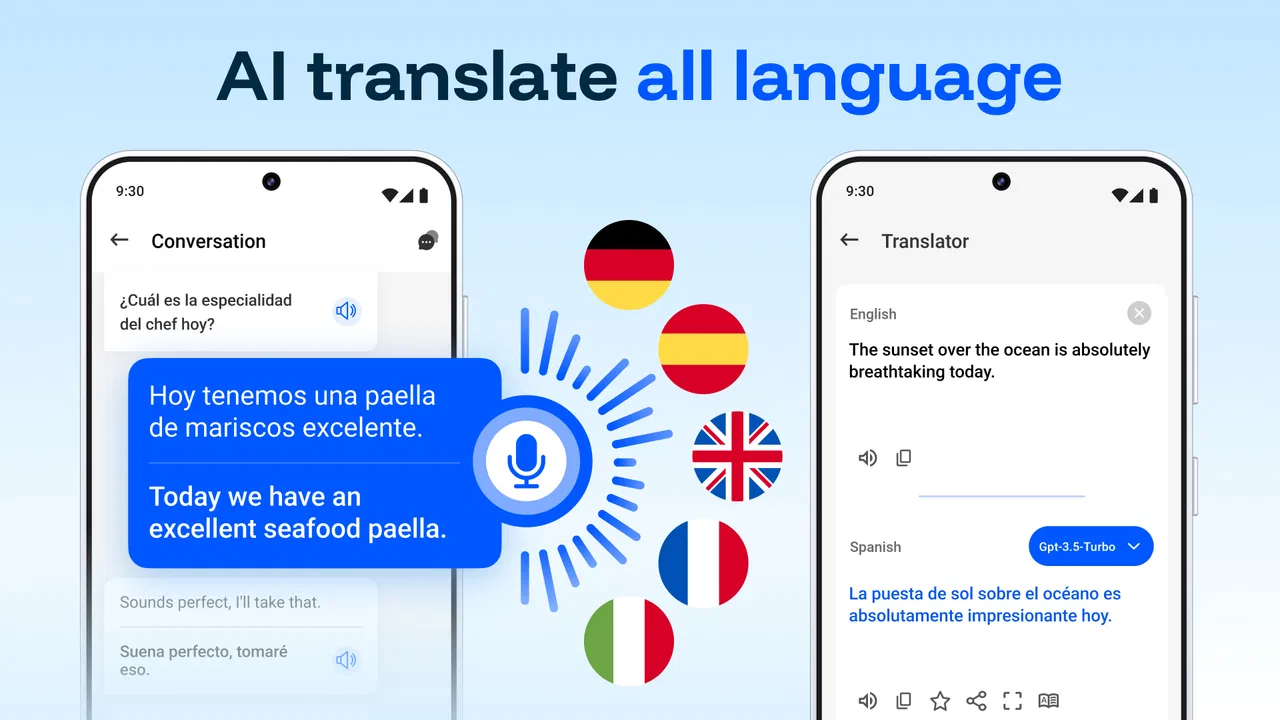
The strongest first impression comes from having several translation routes in one place. If I am looking at printed text, the camera is the obvious starting point. If I already have an image saved, photo translation avoids taking another picture. For a short message, typing is quicker. When my hands are busy or I am trying to communicate with someone nearby, voice input is more natural. That flexibility is more important than it sounds because the best translation method changes with the situation.
You May Also Like

 Blood Strike: 2.5 Anniversary
Blood Strike’s Loadouts Turn Every Drop Into a Tactical Gamble
A close look at Blood Strike’s custom loadouts: how fast access to signature weapons reshapes its battle royale rhythm, rewards preparation, and narrows the gap between fights.

 Pandora - Music & Podcasts
Pandora’s Music Is Easy to Start, but Harder to Recover
Pandora’s strength is its low-effort path from a seed to a station. Its weak spot is how much confidence it asks you to place in connection, setup, and quiet recovery.

 8 Ball Pool
 Is Built on Rivalries, Rematches, and Routine
A close look at the rivalries, rematches, shared routines, and unanswered safety questions that turn a quick pool match into a persistent mobile community.

 Samsung Music
’s Quiet Strength Is Playing What You Already Own
Its reach comes less from spectacle than from dependable access to a personal library. That simplicity is both the app’s strongest retention engine and its ceiling.

 AccuWeather: Weather Radar
AccuWeather Review: A Quick, Clear Forecast for Everyday Decisions
For everyday plans, the best forecast is the one you can understand quickly. AccuWeather makes rain timing, radar, and local conditions easy to act on, with a few trade-offs.

 Hill Climb Racing
Why Hill Climb Racing Still Turns Crashes Into One More Run
A tiny car, a bumpy hill and one more upgrade: Hill Climb Racing keeps resurfacing because its simple chaos makes every near-miss feel personal.
More From Our News Desk



In my first week, I would not treat the app as a replacement for learning basic phrases or checking an important document line by line. I would treat it as a fast bridge between a language I understand and one I do not. That distinction matters. The app can help me understand the general meaning of a sign, message, label, or spoken request, but a quick machine translation still deserves a second look when a mistake could cause confusion.
The camera workflow is particularly useful for travel-style tasks. A restaurant menu, transport notice, product label, or instruction sheet can be easier to understand when I can point the phone at it instead of retyping every word. Photo translation is also helpful for screenshots and images already stored on the device. This is one of the less obvious advantages of having both camera and photo tools: I can choose between immediate reading and careful preparation without changing to a separate app.
Voice translation serves a different purpose. Typing gives me more control over spelling and wording, while speaking is faster when I am in the middle of a conversation. I found that voice input makes the app feel more approachable for people who do not want to construct a sentence on a small keyboard. The trade-off is that speech recognition depends on how clearly the words are spoken and how much background noise is present. For a quiet, short request it is convenient; for a noisy street or a complicated explanation, typing may be safer.
The app is free to start, which lowers the barrier for occasional users. It also includes optional in-app purchases ranging from $0.99 to $99.99 per item. I would pay attention to the exact purchase screen before committing, especially if I only need translation during a trip. A free entry point is valuable, but the long-term cost question matters more for anyone planning to use it every day.
Where it helps in ordinary life
One realistic example is receiving a photo of a short notice from a landlord, school, delivery service, or local office. Instead of copying the text manually, I can use the saved-image route to get an initial understanding, then zoom in on the original and verify names, dates, and instructions. That workflow is faster than typing and more responsible than trusting a single automated result without checking the source image.
Another useful case is shopping in a place where product packaging is unfamiliar. Camera translation can help me identify the broad purpose of an item, while typed translation is better when I want to ask a precise question. I would not rely on the app alone for medical directions, allergy information, legal wording, or safety warnings. In those situations, its value is as a first pass, not as the final authority.
For a student, the app can make short reading tasks less intimidating. I can translate a phrase, compare it with the surrounding sentence, and continue studying instead of stopping at every unknown word. Still, learners should avoid translating entire pages automatically if the goal is to build vocabulary. The app removes friction, but that same convenience can remove the useful effort of understanding grammar and context.
What makes the first-week novelty useful
The novelty here is not just seeing words change from one language to another. It is being able to switch input styles according to the problem in front of me. That makes the app more practical than a basic text-only translator. I can photograph something, speak a request, or type a sentence without maintaining separate tools for each task.
A good habit is to decide what I need before opening the app: a rough meaning, a message I plan to send, or a conversation aid. For a rough meaning, camera or photo translation is efficient. For a message, typing gives me a chance to edit. For a conversation, voice may save time. This small decision prevents me from using the most exciting feature when a simpler one would produce a clearer result.
Does it still earn space after the first month?
After the initial curiosity fades, a translation app has to justify its place through repeated small wins. AI Translate - All language has a reasonable chance of doing that because translation needs come in different shapes. I may use it heavily while traveling, then only occasionally at home for a message, image, or unfamiliar phrase. An app that supports those irregular patterns can remain useful without demanding a daily routine.
The month-to-month value depends on whether I encounter multilingual content often enough. Someone who regularly works with international customers, studies another language, travels, or communicates with relatives abroad will find more reasons to return. Someone who translates one sentence every few months may prefer a built-in browser tool or a familiar system feature instead. The app is most convincing when its multiple input modes solve recurring problems, not when I install it simply because the idea sounds clever.
I also like the possibility of using different workflows for different levels of importance. I can use the camera for quick orientation, typed text for a cleaner request, and photo translation when an image needs another look. That layered approach gives the app more lasting value than a single-button translator. It also encourages better judgement: the more important the text, the more carefully I can inspect the original and the translated result.
There is a practical trade-off between convenience and consistency. A dedicated app puts translation tools together, but it adds another icon, another interface to remember, and possibly another purchase decision. A browser or keyboard translator may be quicker for someone who mostly translates messages. A full language-learning app is better for structured practice. AI Translate - All language makes more sense when I want a general-purpose translation toolbox rather than a course, dictionary, or writing assistant.
Who is likely to keep using it?
I would recommend it most strongly to travelers, multilingual households, international students, casual language learners, and people who frequently receive text in unfamiliar languages. It is also a sensible backup for anyone who wants camera and voice options available in the same productivity app. The Everyone rating makes it approachable for a broad audience, although younger users should still be guided when translating sensitive or consequential material.
I would be more cautious about recommending it to professional translators, legal teams, medical workers, or anyone who needs guaranteed terminology and a documented review process. Those users need specialized tools and human verification. The app can speed up a first pass, but its general-purpose design is not a substitute for professional translation standards.
People who dislike optional purchases may also want to examine how their intended use fits the app before settling into it. Occasional users may be satisfied with the free starting point, while heavy users should consider whether the available purchase structure matches their budget and expectations. I would not assume that a free download means every long-term use case will remain cost-free.
Maintenance, friction, and the reasons fatigue can set in
The maintenance burden is fairly ordinary but still worth considering. I need to keep the app available, remember which input mode suits the task, and remain alert to translation errors. Camera-based tools also work best when I hold the phone steadily and capture readable text. If the image is crowded, blurry, stylized, or partly hidden, I may spend more time correcting the process than I would have spent typing a short sentence.
Voice input can create a different kind of friction. It is appealing when I am in a hurry, but speaking a sentence aloud is not always appropriate in public, at work, or around other people. Accents, pronunciation, background noise, and ambiguous wording can also affect the result. I would keep typing as my dependable fallback rather than treating voice as the default for every situation.
There is also the mental burden of checking context. A translated word can be technically plausible while still being wrong for the sentence, relationship, or culture involved. A casual phrase may need a different tone from a formal request. Camera translation can tell me what a sign broadly says without explaining whether it is a warning, a suggestion, or a strict instruction. The app reduces the language barrier, but it does not remove the need to interpret what the text is doing.
One useful maintenance habit is to preserve the original image or message whenever the translation matters. I can compare the result with the source, ask a fluent speaker for confirmation, and avoid losing the exact wording. For quick shopping or travel decisions, that may be unnecessary. For appointments, contracts, medication, or official communication, it is a sensible safeguard.
Where repeated use may become tiring
The first source of fatigue is switching between convenience and accuracy. The fastest method is not always the clearest one, and the clearest method is not always available. I may begin with voice, move to typing, then take a photo to inspect a phrase. That flexibility is useful, but it can feel like extra work when I only need a simple answer.
The second is the temptation to translate too much. A camera tool encourages me to point at an entire page, package, or wall of text. The result may be less useful than selecting the important sentence and checking it carefully. I get better practical value when I use the app in small sections and keep the surrounding context visible.
The third is dependence. If I use the app for every phrase, I may stop remembering common expressions or noticing patterns in another language. My preferred long-term approach is to use it as a support tool: translate the unfamiliar part, record what I learned, and try to recognize it next time. That turns a quick utility into something slightly more educational without pretending it is a complete language course.
Finally, the app may not be the best choice when speed is the only priority. If I already have a translation feature built into a keyboard, browser, or messaging service, opening a separate app can feel unnecessary. The dedicated interface earns its place when I need camera, photo, text, and voice options together. Without that need, the extra step may outweigh the benefit.
My long-term verdict
AI Translate - All language is more convincing as a practical utility than as a novelty. Its strength is the combination of camera, saved-photo, typed-text, and voice workflows, giving me several ways to handle the same language problem. DOSA Apps has positioned it in the productivity space, and that feels accurate: I use it to get through tasks, not to spend time exploring a feature showcase.
The app earns lasting space on my phone if I regularly encounter unfamiliar languages and want one flexible tool ready for different situations. It is especially useful when a photo or spoken request would be inconvenient to reproduce manually. The strongest routine is to use the quickest method for low-risk understanding, then slow down and verify the original whenever the consequences of a mistake are serious.
Its limitations are equally clear. Automated translation can miss tone and context, voice input is not ideal in every environment, image translation depends on readable text, and optional purchases mean heavy users should review the cost before building a daily habit. People who need professional-grade accuracy, structured language study, or instant keyboard integration may be better served by a specialized alternative.
For me, the deciding question is not whether the app can impress me during the first week. It can. The better question is whether I will still open it when the novelty has gone. If my routine includes travel, multilingual messages, foreign packaging, or occasional conversations across languages, the answer is yes. Its lasting value comes from reducing small moments of friction without forcing me into one translation method. I would recommend trying the free version, testing camera, photo, text, and voice tasks that resemble real life, and then deciding whether it deserves a permanent place in my everyday toolkit.
FAQs for AI Translate - All language
01What is AI Translate - All language, and what can it translate?
AI Translate - All language is a translation app designed to help users convert text between multiple languages. Depending on the version and available services, it may support typed text, copied content, conversational phrases, and sometimes voice or camera-based translation. It is useful for travel, study, messaging, and everyday communication, although language availability and translation quality can vary.
02Does AI Translate - All language require an internet connection?
Most translation features generally work best with an active internet connection because the app may send text or speech to online translation services for processing. Some versions may offer limited offline functionality, but this should not be assumed before traveling or using the app without mobile data. It is worth checking the app’s settings and downloading any supported offline language packs in advance.
03Is AI Translate - All language accurate enough for important communication?
The app can be helpful for everyday phrases, quick messages, travel questions, and general understanding, but automated translation is not perfect. Accuracy may change depending on the language pair, sentence length, spelling, slang, and context. Users should carefully review translations involving legal documents, medical information, business agreements, or other situations where a small misunderstanding could have serious consequences.
04Does the app support voice, camera, or conversation translation?
AI Translate - All language may include additional tools such as voice input, spoken output, image or camera translation, and conversation support, but the exact features can depend on the device, operating system, app version, and subscription plan. Microphone and camera permissions may be required. Before downloading, users should review the current store listing to confirm which tools are available.
05Is AI Translate - All language free to use, and are there advertisements or in-app purchases?
The app may be available as a free download while offering optional purchases, subscriptions, advertisements, or limits on advanced translation features. Charges can apply to premium languages, unlimited usage, voice functions, camera translation, or an ad-free experience. Users should read the pricing details shown in Google Play or the App Store and check the trial and cancellation terms before subscribing.
Pros
- Supports translations across a wide range of languages.
- Simple interface makes common translations quick to access.
- Useful for translating short text while traveling or studying.
- Voice input can make hands-free translation more convenient.
- Translation history helps users revisit recent phrases easily.
Cons
- Accuracy may vary with slang
- accents
- and complex sentences.
- Some features may require an internet connection to work properly.
- Free use may include advertisements or usage limitations.
- Privacy policies should be checked before submitting sensitive text.
- Results may need manual checking for professional or formal content.

AI Translate - All language
Gallery